

If you’ve ever stared at a blank page wondering how to write a cover letter for visa application, you’re not alone. Beginners often know what documents to submit but struggle with how to explain them clearly. That’s where VCL. — Visa Covering Letter makes a real difference.
VCL. is not just a template. It’s a structured workflow that helps you create a professional, accurate, and embassy-ready visa cover letter in minutes, without guessing formats or copying random samples online.
This guide walks you through the full VCL. process step by step, so you can confidently create a visa cover letter that aligns with your documents and speaks the language visa officers expect.
Quick answer: how VCL helps?
VCL helps you create a cover letter for visa application in minutes by following a structured logic.
In simple terms, the workflow looks like this:
- Choose your destination country and visa type
- Enter passport-matching applicant details
- Add embassy and submission information
- Build a clear travel itinerary cover letter section
- Align funding and supporting documents
- Review accuracy using a checklist
- Receive your editable visa cover letter by email (PDF)
This process reduces confusion, improves document alignment, and saves time, especially for first-time applicants.
What is VCL. and why it works?
VCL. stands for Visa Covering Letter. It’s a guided method used to create visa cover letters based on your actual application details, not generic templates.
Instead of asking you to “write a letter,” VCL.:
- Breaks the task into clear form steps
- Forces accuracy and consistency
- Matches your letter with your itinerary and documents
- Produces an ATS-friendly visa cover letter in professional format
Expert Note:
Industry research commonly shows that visa delays often come from inconsistencies, not missing documents. VCL. is designed to prevent those inconsistencies before submission.
Why writing a visa cover letter manually is hard for beginners.
Most beginners struggle because:
- Each visa type expects a different explanation
- Embassy tone is formal but not emotional
- Small date or funding errors cause big problems
- Online samples rarely match real applications
A manual approach often results in:
- Mismatched dates between itinerary and letter
- Unclear funding explanations
- Overly casual or overly dramatic language
VCL. replaces guesswork with structure.

The complete VCL. workflow (step-by-step).
Below is the exact workflow used to generate a visa cover letter using VCL.
Step 1: Choose Country of Application and Visa Type
You begin by selecting:
- Country where the visa is being applied
- Visa type (tourist, business, study, family visit, etc.)
This choice controls:
- Letter tone
- Required sections
- Compliance language
A tourist visa letter and a business visa letter are not interchangeable. VCL. adjusts the logic automatically.
Step 2: Enter Applicant Information (Passport-Matching Details)
You enter details exactly as shown on your passport:
- Full legal name
- Nationality
- Passport number
- Date of birth
Accuracy here is critical. Any mismatch can raise red flags.
Step 3: Add Address and Embassy/Consulate Submission Details
This step defines:
- Where the application is submitted
- Which embassy or consulate the letter is addressed to
Correct embassy details signal seriousness and preparation.
Step 4: Select Applicant Profile (What This Means)
You choose the profile that best describes you:
- Employee
- Self-employed
- Skilled worker
- Student
- Sponsored traveler
Each profile changes:
- How funding is explained
- How ties are described
- What supporting documents are referenced
This prevents generic explanations that don’t fit your situation.
Step 5: Add Travel Itinerary (Core of the Letter)
This step builds the travel itinerary cover letter section.
You provide:
- Entry city and exit city
- Travel dates
- Accommodation type
- Mode of travel
- Multiple countries (if applicable)
The itinerary section must align with flights and hotels. VCL. ensures consistency.
Step 6: Add Supporting Documents (Editable List)
You select documents you are submitting, such as:
- Passport copy
- Flight reservation
- Hotel booking
- Proof of funds
- Invitation letter (if applicable)
Why this matters:
The cover letter must reference the same documents the officer sees. VCL. ensures document alignment.
Step 7: Review Using Accuracy + Consistency Checklist
Before generation, VCL runs a review checklist:
- Dates match itinerary and bookings
- Funding explanation makes sense
- Purpose matches visa type
- Embassy details are correct
This step alone prevents most avoidable mistakes.
Step 8: Complete Payment (Neutral, Professional Step)
Once details are confirmed:
- Payment is completed securely
- Letter moves to processing
No design or wording choices are needed from you at this stage.
Step 9: Email Delivery (PDF)
Your cover letter is delivered via delivery email as:
- PDF visa cover letter (print-ready)
This gives flexibility for printing or minor edits.
Step 10: Revisions Within 24 Hours
If you spot an error:
- Revisions within 24 hours are allowed
- Corrections are limited to submitted details
- No formatting or design changes
This ensures fairness and accuracy.
Before you submit: review checklist.
Use this checklist before uploading or printing your letter:
- Applicant name matches passport
- Passport number is correct
- Dates align across itinerary, hotel, and flight
- Funding explanation matches proof
- Purpose is clear and specific
- Document list matches attachments
- Embassy/consulate details are accurate
Common mistakes (and How VCL. fixes them).
Mistake 1: Conflicting travel dates
Fix: VCL. locks dates across itinerary and letter
Mistake 2: Unclear funding source
Fix: Profile-based funding logic
Mistake 3: Wrong embassy name
Fix: Embassy selection step
Mistake 4: Generic copied wording
Fix: Data-driven content generation
Mistake 5: Missing return intent
Fix: Built-in compliance language
Mistake 6: Listing documents not attached
Fix: Editable document list
Mistake 7: Overly emotional tone
Fix: Neutral, professional structure
Mistake 8: Wrong visa category language
Fix: Visa-type-specific logic
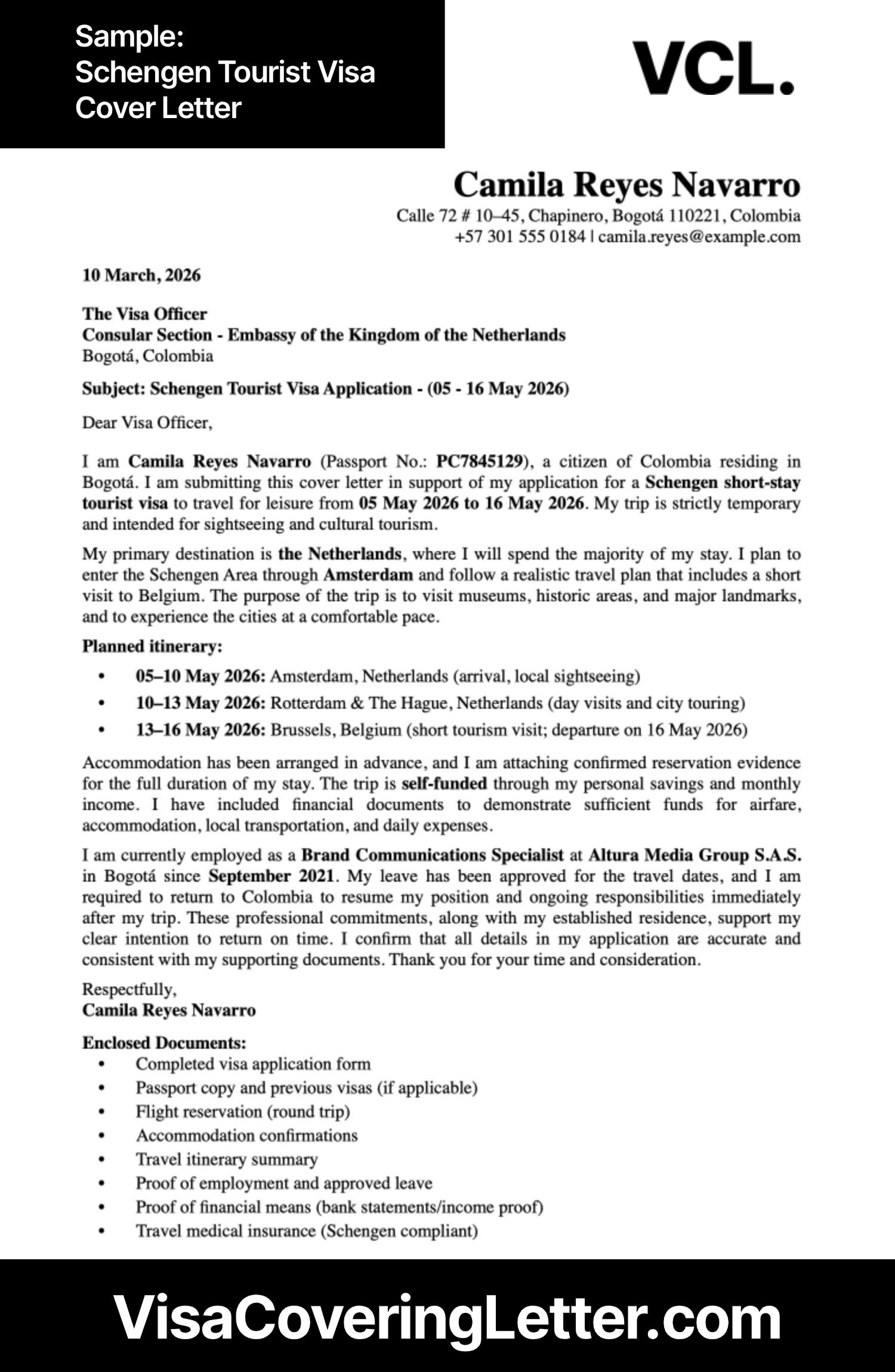
Schengen tourist visa cover letter format:
Camila Reyes Navarro
Calle 72 # 10–45, Chapinero, Bogotá 110221, Colombia
+57 301 555 0184 | camila.reyes@example.com
10 March, 2026
The Visa Officer
Consular Section – Embassy of the Kingdom of the Netherlands
Bogotá, Colombia
Subject: Schengen Tourist Visa Application – (05 – 16 May 2026)
Dear Visa Officer,
I am Camila Reyes Navarro (Passport No.: PC7845129), a citizen of Colombia residing in Bogotá. I am submitting this cover letter in support of my application for a Schengen short-stay tourist visa to travel for leisure from 05 May 2026 to 16 May 2026. My trip is strictly temporary and intended for sightseeing and cultural tourism.
My primary destination is the Netherlands, where I will spend the majority of my stay. I plan to enter the Schengen Area through Amsterdam and follow a realistic travel plan that includes a short visit to Belgium. The purpose of the trip is to visit museums, historic areas, and major landmarks, and to experience the cities at a comfortable pace.
Planned itinerary:
- 05–10 May 2026: Amsterdam, Netherlands (arrival, local sightseeing)
- 10–13 May 2026: Rotterdam & The Hague, Netherlands (day visits and city touring) • 13–16 May 2026: Brussels, Belgium (short tourism visit; departure on 16 May 2026)
Accommodation has been arranged in advance, and I am attaching confirmed reservation evidence for the full duration of my stay. The trip is self-funded through my personal savings and monthly income. I have included financial documents to demonstrate sufficient funds for airfare, accommodation, local transportation, and daily expenses.
I am currently employed as a Brand Communications Specialist at Altura Media Group S.A.S. in Bogotá since September 2021. My leave has been approved for the travel dates, and I am required to return to Colombia to resume my position and ongoing responsibilities immediately after my trip. These professional commitments, along with my established residence, support my clear intention to return on time. I confirm that all details in my application are accurate and consistent with my supporting documents. Thank you for your time and consideration.
Respectfully,
Camila Reyes Navarro
Enclosed Documents:
- Completed visa application form
- Passport copy and previous visas (if applicable)
- Flight reservation (round trip)
- Accommodation confirmations
- Travel itinerary summary
- Proof of employment and approved leave
- Proof of financial means (bank statements/income proof)
- Travel medical insurance (Schengen compliant)
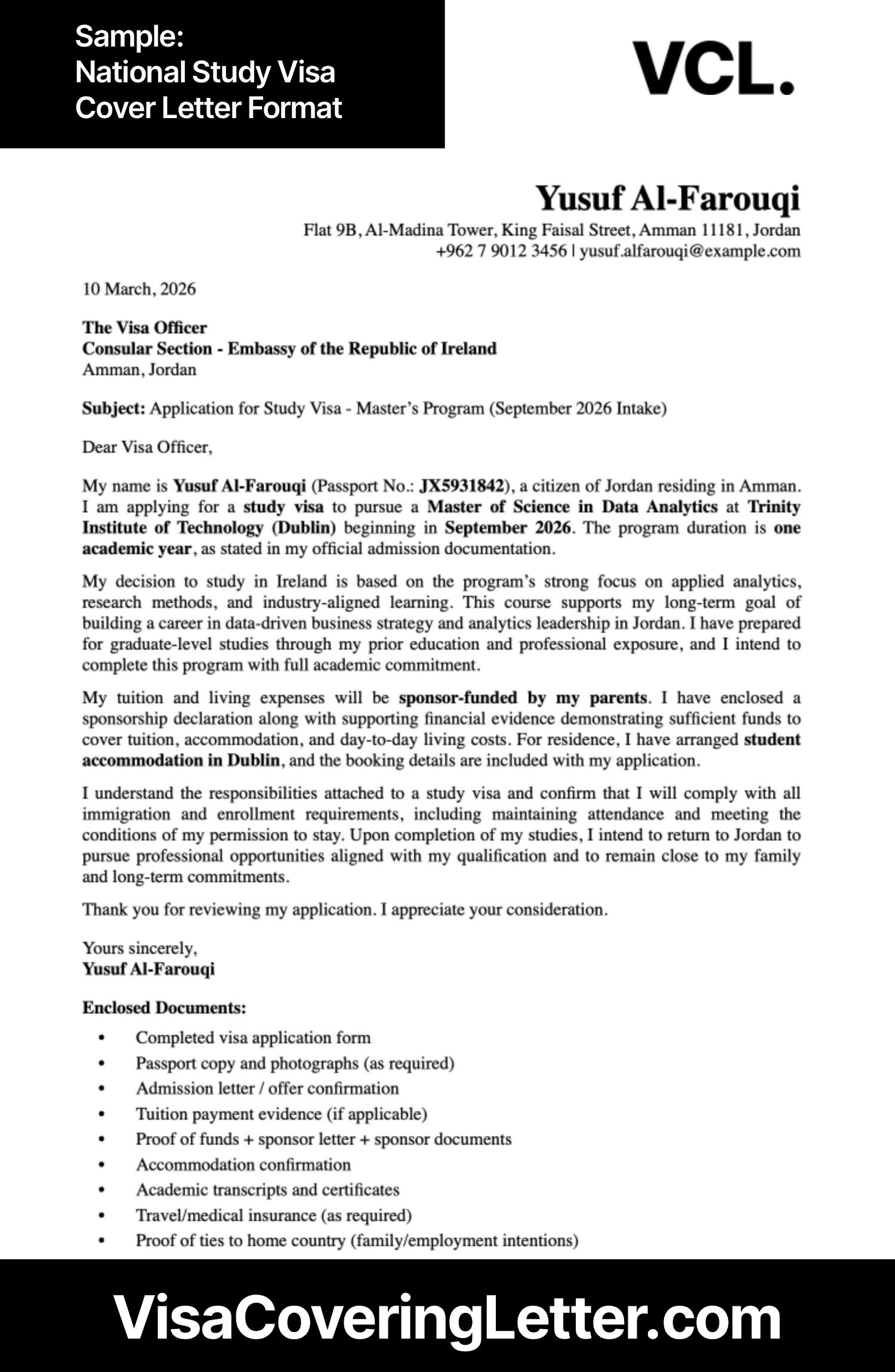
National study visa covering letter format:
Yusuf Al-Farouqi
Flat 9B, Al-Madina Tower, King Faisal Street, Amman 11181, Jordan
+962 7 9012 3456 | yusuf.alfarouqi@example.com
10 March, 2026
The Visa Officer
Consular Section – Embassy of the Republic of Ireland
Amman, Jordan
Subject: Application for Study Visa – Master’s Program (September 2026 Intake) Dear Visa Officer,
My name is Yusuf Al-Farouqi (Passport No.: JX5931842), a citizen of Jordan residing in Amman. I am applying for a study visa to pursue a Master of Science in Data Analytics at Trinity Institute of Technology (Dublin) beginning in September 2026. The program duration is one academic year, as stated in my official admission documentation.
My decision to study in Ireland is based on the program’s strong focus on applied analytics, research methods, and industry-aligned learning. This course supports my long-term goal of building a career in data-driven business strategy and analytics leadership in Jordan. I have prepared for graduate-level studies through my prior education and professional exposure, and I intend to complete this program with full academic commitment.
My tuition and living expenses will be sponsor-funded by my parents. I have enclosed a sponsorship declaration along with supporting financial evidence demonstrating sufficient funds to cover tuition, accommodation, and day-to-day living costs. For residence, I have arranged student accommodation in Dublin, and the booking details are included with my application.
I understand the responsibilities attached to a study visa and confirm that I will comply with all immigration and enrollment requirements, including maintaining attendance and meeting the conditions of my permission to stay. Upon completion of my studies, I intend to return to Jordan to pursue professional opportunities aligned with my qualification and to remain close to my family and long-term commitments.
Thank you for reviewing my application. I appreciate your consideration.
Yours sincerely,
Yusuf Al-Farouqi
Enclosed Documents:
- Completed visa application form
- Passport copy and photographs (as required)
- Admission letter / offer confirmation
- Tuition payment evidence (if applicable)
- Proof of funds + sponsor letter + sponsor documents
- Accommodation confirmation
- Academic transcripts and certificates
- Travel/medical insurance (as required)
- Proof of ties to home country (family/employment intentions)
What you should have ready before using VCL.?
To move quickly, prepare:
- Passport details
- Travel dates and cities
- Accommodation plan
- Proof of funds
- Invitation or sponsor details (if any)
Having these ready makes the process smooth and fast.
Who this VCL. workflow is for?
This workflow is ideal for:
- First-time visa applicants
- Travelers unsure how to format letters
- Applicants applying on short timelines
- Anyone needing an editable visa cover letter
Who should slow down or seek extra support.
You may need extra review if:
- Your documents conflict
- You have prior refusals
- Your itinerary changes frequently
VCL helps with structure, but accuracy still depends on correct inputs.
Frequently asked questions.
Can I really create a visa cover letter in minutes using VCL.?
Yes, once your details are ready, the workflow is fast and structured.
Is the letter editable after delivery?
Yes. You may edit the PDF version.
How does VCL. differ from a visa cover letter builder?
A builder gives templates. VCL. applies logic and document alignment.
Can I edit the visa cover letter after delivery?
Yes. Minor text edits can be done in the PDF file.
Does VCL. work for different visa types?
Yes. The workflow adapts based on visa category.
Are revisions allowed?
Yes. Revisions within 24 hours are available for factual corrections.
Is this suitable for beginners?
Absolutely. It is designed specifically for beginners.
Does using a generator affect acceptance?
No. Accuracy and consistency matter more than how it’s created.
Conclusion.
Creating a cover letter for visa application doesn’t have to be confusing or time-consuming. With VCL’s structured workflow, you can generate a clear, accurate, and professional letter in minutes. Focus on correct inputs, review carefully, and let logic—not guesswork—do the heavy lifting.